The app exists because I needed it.
I’m a mechanical engineer. I spent decades designing large-scale industrial equipment — not software. But in 2024, I wanted a simple running app that tracked my shoe mileage properly, showed me my routes, and didn’t require a subscription to see my own training data. I couldn’t find one that did all three without strings attached.
So I built it. With no formal coding background, using AI development tools and a lot of patience. The first version hit the App Store review process in early 2025. Then Apple rejected it. Then again. And again. Thirty-nine rejections over several months — each one a different reason, some of them genuinely baffling. I kept fixing and resubmitting.
RunMate Pro launched in September 2025. It’s been on the App Store since then, and it’s free.
That’s the origin story of the Official Running App of the Mercedes-Benz Oakville Bronte Harbour Classic 5K.
Quick Answer: RunMate Pro is a free GPS running app for iOS that tracks shoe mileage, records routes, and logs training history — no account or subscription required. It’s the Official Running App of the Mercedes-Benz Oakville Bronte Harbour Classic 5K, built by Race Co-Director Greg Kowalczyk. Download free at runmatepro.com.
What RunMate Pro Does
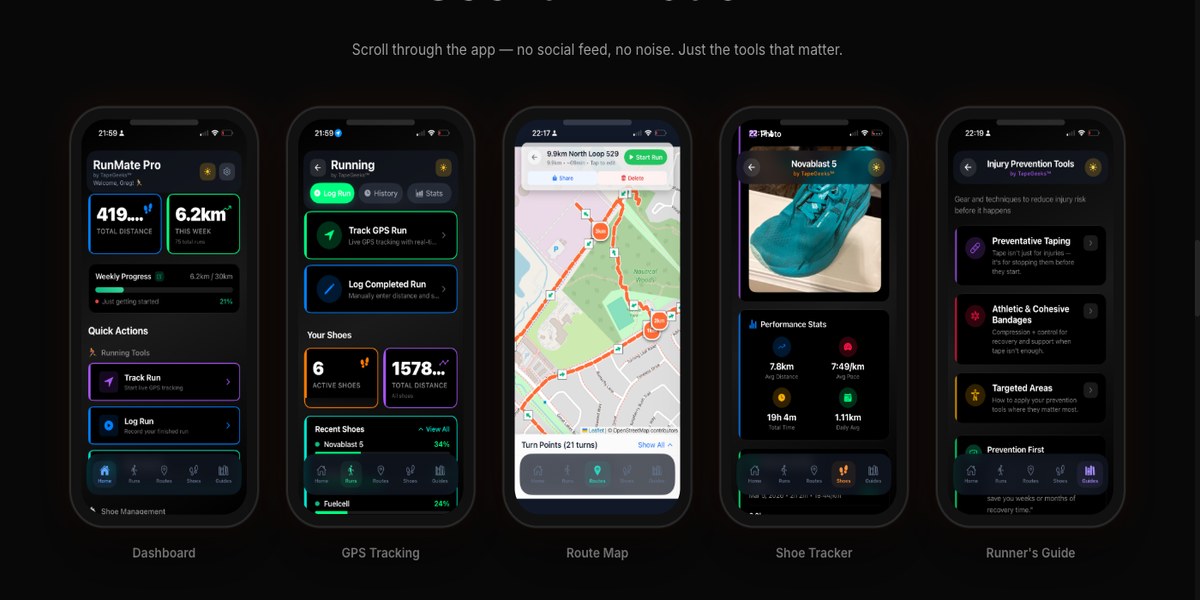
RunMate Pro is a free GPS running app built around three core features that most paid apps hide behind subscriptions: GPS tracking, shoe mileage tracking, and route management.
GPS tracking — records your route, pace, distance, and time for every run. Nothing unusual there. But the data is yours, stored on your device, with no account required to access it.
Shoe mileage tracking — the reason the app exists. You add your running shoes to the app, and every run you log gets assigned to a specific pair. You always know exactly how many kilometres are on each pair of shoes. Simple, useful, and missing from most free apps.
Route management — save your favourite routes, see your history by location, and track how your pace on a familiar route changes as your fitness improves over a training block.
Training history — a clear weekly and monthly view of your volume. See how much you ran last week vs. the week before. This matters more than most people realize when you’re building toward a race.
The Injury Prevention Case: Your Shoes Are Lying to You
Most running shoes last 500 to 800 km. After that, the midsole foam — the part that actually absorbs impact — breaks down. The shoe still looks fine on the outside. The cushioning that protects your joints is quietly gone.
Running on a worn-out midsole is like driving on bald tires: everything seems okay until something goes wrong. In running terms, “something goes wrong” means knee pain, shin splints, or a stress fracture that ends your season.
Research published in the British Journal of Sports Medicine has consistently linked midsole compression in used shoes to increased lower-limb injury risk. The number most sports medicine practitioners use: replace your shoes every 600–800 km, or earlier if you feel the cushioning go.
The problem is that most runners have no idea how many kilometres are on their shoes. They buy a pair, run in it for a year, and wonder why their knees started hurting in March.
RunMate solves this. Every run you log gets counted against the pair you were wearing. The app shows you exactly where each pair stands. At 600 km, you know it’s time.
Roughly 65–70% of recreational runners get injured in any given training year. A systematic review by van Gent et al. in the British Journal of Sports Medicine found injury incidence rates ranging from 19% to 79% per year depending on training load — with overuse injuries dominating. Worn-out shoes are one of the most preventable contributors. Tracking mileage is a two-minute setup that pays off across every training block you do after this one.
How to Use RunMate Pro to Train for a 5K
Training for June 21 starts now. Here’s the practical setup.
Week one: Download the app, add your shoes, log your first run. That’s it. Don’t overthink the data yet — just start building the habit of logging every session.
Weeks two through four: Watch your weekly volume. If you’re following our 8-week beginner training plan, your runs are mostly short intervals. RunMate shows you the cumulative picture: total kilometres for the week, total time on feet. This is your baseline.
Weeks five through eight: Volume builds. You start running longer continuous efforts. The GPS route view becomes useful here — you can see exactly how far a 20-minute run takes you, calibrate your pace, and start understanding what race pace actually feels like on the Bronte waterfront.
Race week: Check your shoe mileage. If either pair you’ve been training in is approaching 600 km, get new shoes now — not the week after the race. New shoes need at least two or three runs to break in before race day.
One specific habit worth building: log your runs within an hour of finishing them. The GPS data exports cleanly while it’s fresh. If you wait two days, it becomes easy to skip entirely. Consistent logging is what makes the shoe mileage data accurate.
The TapeGeeks Connection: Training Data Meets Injury Prevention
RunMate Pro and TapeGeeks come from the same place. Same team, same runners. But they do different jobs — and together, they cover the full picture of running injury-free.
RunMate is the data layer. It shows you the cumulative load on your body and your shoes over weeks and months. Shoe mileage numbers. Weekly volume trends. Route paces over time. This is information most runners are guessing at.
TapeGeeks is the treatment and prevention layer. Built around kinesiology tape and sports medicine expertise, it gives you the tools to manage what training load does to your joints, tendons, and soft tissue — before it becomes an injury that sidelines you.
Here’s how the two connect in practice:
Shoe mileage → replacement trigger → injury prevention. RunMate tracks exactly how many kilometres are on each pair. When a shoe approaches 500 km, the midsole foam starts losing its protective function. At 600 km, it’s gone. The four injuries that show up most often when runners ignore worn midsoles: runner’s knee, IT band syndrome, shin splints, and plantar fasciitis. These aren’t bad luck — they’re predictable load-management failures. Knowing your shoe mileage removes the guesswork.
Volume spikes → taping signals. When RunMate shows your weekly volume jumping — week 3 to week 4, say, from 15 km to 22 km — that’s the window where overuse injuries start. Adding kinesiology tape to an IT band or shin that’s been nagging is a 5-minute intervention that can keep the training block intact. The app tells you when you’re loading up. TapeGeeks gives you the response.
Injury-specific guidance built into RunMate Pro. The app includes a full Runner’s Guide covering the five most common running injuries — how they develop, how to treat them, and how to prevent them from coming back. Runner’s knee, IT band syndrome, shin splints, plantar fasciitis, Achilles tendinopathy. Each one explained clearly, with prevention protocols built around training habits and taping techniques from TapeGeeks.
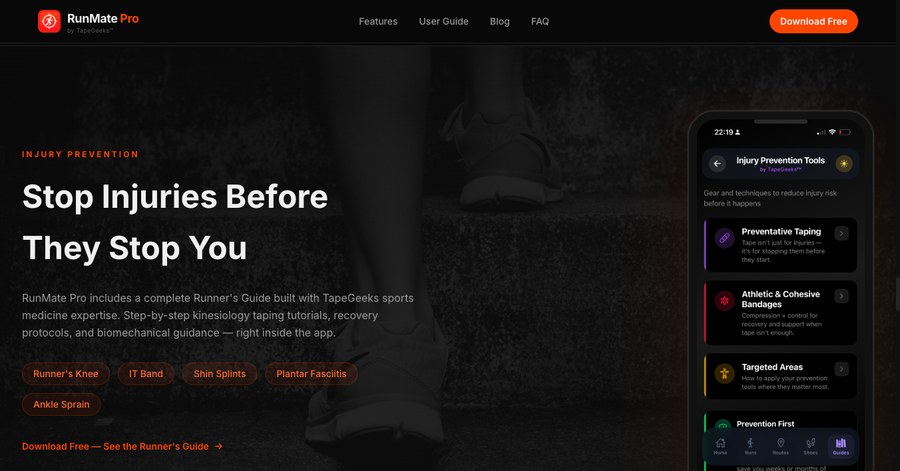
The injury prevention section inside RunMate Pro is powered by TapeGeeks. Preventative taping guides, athletic and cohesive bandage protocols, and targeted treatment areas for each common running injury — all inside the app you’re already using to log your training.
They’re built for the same runners — people training consistently for a goal, not elite athletes with a full support staff. The chain is simple: RunMate shows you what’s happening with your load and your shoes. TapeGeeks gives you the tools to respond before something hurts.
Read more about TapeGeeks and what’s available at the race →
At BHC on Race Day
The app you’ve been training with was built by one of the people who organized the race you’re running.
I use RunMate Pro on every Bronte Runners group run. I know the waterfront route by GPS. I’ve logged hundreds of kilometres on it. When you cross the finish line at Bronte Harbour Park on June 21, the co-director who built the app you trained with will be there.
That’s a small thing, but it matters to me. This race isn’t a large commercial operation with a distant organizing company. It’s built by people who run the routes themselves.
If you’re heading into race morning and haven’t logged your training consistently, that’s fine — you can still run. But if you start now, you’ll arrive at June 21 with weeks of data showing you exactly what shape you’re in. That confidence is worth something at an 8:00 AM start.
Frequently Asked Questions
Is RunMate Pro really free?
Yes, completely. No subscription, no premium tier, no ads. You don’t need to create an account or hand over an email address. The app works offline. Your data stays on your device. I built it because I wanted a free tool that actually worked — that’s still the version you download today.
How does shoe mileage tracking prevent injuries?
Running shoe midsoles are made of foam that compresses over time. Once a midsole loses its cushioning — typically around 600–800 km depending on the shoe and your body weight — your joints absorb significantly more impact with each stride. This increased load is directly linked to shin splints, stress fractures, and knee pain. Tracking mileage by shoe gives you a concrete trigger for replacement instead of waiting until something hurts. Most runners who start tracking are surprised by how quickly 600 km arrives.
Can I use RunMate Pro to train for my first 5K?
Yes, and it’s a good fit for beginners specifically. You don’t need advanced metrics. Set up your shoes, log your runs, and watch your weekly volume build. The shoe mileage tracker is particularly useful for first-time runners because you may not realize how quickly training kilometres accumulate on a single pair. If you’re following our beginner training plan, RunMate gives you the data layer on top of the plan — so you can see your progress week over week.
What’s the difference between RunMate Pro and other running apps?
Most popular running apps are either paywalled behind subscriptions (Strava, Garmin Connect premium features) or require account creation and ongoing data collection. RunMate Pro doesn’t have either. The specific differentiator is the shoe mileage tracker — it’s the core feature other apps treat as an afterthought or lock behind a paid tier. RunMate was built specifically because that feature should be free and prominent, not buried in a settings menu. It’s a focused tool rather than a platform.
Training starts now. Download RunMate Pro free on iOS at runmatepro.com, log your first run today, and register for the race at bronteharbourclassic.com/register/.
June 21 at Bronte Harbour Park. See you at the start line.